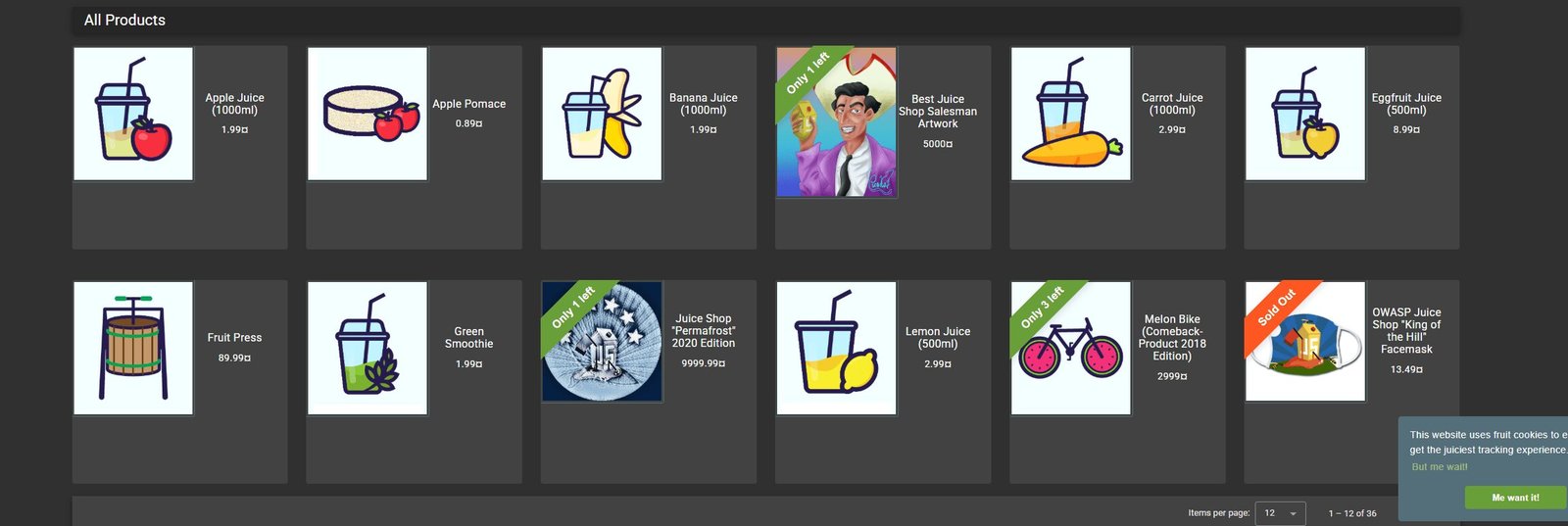
The official local Docker setup is: pull bkimminich/juice-shop, run it with docker run --rm -p 127.0.0.1:3000:3000 bkimminich/juice-shop, and browse to http://localhost:3000.
The current official GitHub README lists the localhost-bound command, the bkimminich/juice-shop Docker Hub page hosts the image, and the OWASP Foundation project page identifies Juice Shop as an intentionally insecure application for training, awareness demonstrations, capture-the-flag exercises, and security-tool evaluation.
Official OWASP Juice Shop Docker Run Command
The highest-impression query—owasp juice shop docker run bkimminich/juice-shop official—has a direct answer in the current project repository.
docker pull bkimminich/juice-shop
docker run --rm -p 127.0.0.1:3000:3000 bkimminich/juice-shop
The official OWASP Juice Shop GitHub README currently documents this exact workflow. After the container starts, open http://localhost:3000.
Official command with a container name
docker run --rm --name juice-shop -p 127.0.0.1:3000:3000 bkimminich/juice-shop
The optional --name juice-shop makes status, log, and stop commands easier to read. It does not change the application itself.
Detached local run
docker run -d --rm --name juice-shop -p 127.0.0.1:3000:3000 bkimminich/juice-shop
The -d flag runs the container in the background. Use docker logs -f juice-shop to follow its output and docker stop juice-shop to stop it.

Official OWASP Juice Shop Website, GitHub, Docker Hub, and Documentation
Search results repeatedly include words such as official, official docs, official documentation, and official image. Those modifiers matter because a deliberately vulnerable application should not be downloaded from an unknown mirror.
| Official resource | What it confirms | When to use it |
|---|---|---|
| OWASP Foundation project page | Project ownership, purpose, technology, and official entry points | Verify the project and its training purpose |
| Official Juice Shop website | Current project information and links to documentation | Start research from the project website |
| Official GitHub repository | Source, README, setup commands, supported runtimes, issues, and code history | Verify the current Docker command and source |
| Official GitHub releases | Latest version, release dates, packaged assets, and checksums | Pin a reproducible workshop version |
| Docker Hub bkimminich/juice-shop | Official container repository and available image tags | Pull the trusted Docker image |
| Official running guide | Source, packaged distribution, Docker, and other run options | Compare supported setup paths |
| Official companion guide | Training context, challenge guidance, customization, and operations | Prepare structured learning and workshops |
| Official security policy | Currently supported release branch and vulnerability-reporting policy | Check patch support before deployment |
The official image name is bkimminich/juice-shop. The Docker Hub page, GitHub repository, and official documentation all converge on that image name, which directly addresses searches for docker hub bkimminich/juice-shop official and owasp juice shop official docker image bkimminich/juice-shop.
OWASP Juice Shop Docker Image and Latest Release in 2026
As of August 1, 2026, the official GitHub releases page identifies v20.1.1 as the latest release, published June 23, 2026. The official security policy currently lists 20.1.x as the supported branch.
| Choice | Image reference | Best use | Tradeoff |
|---|---|---|---|
| Current stable image | bkimminich/juice-shop |
Quick local lab and current official setup | The resolved image can change over time |
| Pinned 2026 release | bkimminich/juice-shop:v20.1.1 |
Reproducible workshop and documented test run | Must be reviewed when the supported branch changes |
| Development snapshot | bkimminich/juice-shop:snapshot |
Project development and preview testing | Not the stable choice for normal training |
| Unknown third-party image | Unverified repository | Avoid | Unknown modifications, provenance, and update policy |
Pin v20.1.1 for a repeatable lab
docker pull bkimminich/juice-shop:v20.1.1

docker run --rm --name juice-shop   -p 127.0.0.1:3000:3000   bkimminich/juice-shop:v20.1.1
Before publishing training instructions, verify the release page and supported-version policy again. The words official 2026 should indicate current verification, not a permanently fixed version.
OWASP Juice Shop Docker Run Port 3000 Command Explained
| Command part | Meaning | Why it matters |
|---|---|---|
docker run |
Creates and starts a container from an image | Launches the local Juice Shop lab |
--rm |
Removes the container after it stops | Keeps disposable labs cleaner |
--name juice-shop |
Assigns a readable container name | Simplifies logs, status, and stop commands |
-p 127.0.0.1:3000:3000 |
Maps host loopback port 3000 to container port 3000 | Keeps the normal lab accessible from the Docker host |
bkimminich/juice-shop |
Official Docker image repository | Matches the official project setup |
:v20.1.1 |
Optional pinned version tag | Improves reproducibility |
Why the host IP matters
Docker documents that port mappings without a host address publish to all host addresses by default. The Docker run reference also warns that omitting the IP address can make the published port externally accessible. Because Juice Shop is intentionally insecure, prefer the current official README command with 127.0.0.1 for a local lab.
-p 3000:3000 normally publishes on all host interfaces, while -p 127.0.0.1:3000:3000 targets the local loopback interface. Firewall and Docker-network behavior should still be verified in the actual environment.Install Docker for OWASP Juice Shop
Do not rely on a generic package command copied from an old blog. Docker installation steps and supported operating systems change. Use current Docker documentation for the platform.
| Platform | Official installation source | Post-install check |
|---|---|---|
| Windows | Docker Desktop for Windows installation guide | docker --version |
| macOS | Docker Desktop for Mac installation guide | docker --version |
| Ubuntu | Docker Engine on Ubuntu installation guide | docker run hello-world |
| Other Linux systems | Use the matching distribution page in Docker’s official Engine documentation | Verify daemon, CLI, and permissions |
Docker’s current Ubuntu documentation specifically warns that distribution-provided packages such as docker.io can conflict with Docker’s official Engine packages. That is why the refined article links to the current platform documentation instead of presenting one stale installation recipe as universal.
Run OWASP Juice Shop Locally on Port 3000
1. Pull the official image
docker pull bkimminich/juice-shop
2. Start the local container
docker run -d --rm --name juice-shop -p 127.0.0.1:3000:3000 bkimminich/juice-shop
3. Confirm the container is running
docker ps
docker logs --tail 50 juice-shop
4. Open the application
http://localhost:3000
5. Stop the lab
docker stop juice-shop
The official setup is intentionally simple. Keep real credentials, customer information, production tokens, and corporate secrets out of the lab.

OWASP Juice Shop Docker Troubleshooting
| Symptom | Check | Safe next step |
|---|---|---|
| Docker command not found | docker --version |
Use the official Docker installation guide for the OS |
| Cannot connect to Docker daemon | Docker Desktop or Engine service state | Start Docker and verify the selected Docker context |
| Port 3000 already in use | Existing process or container using the port | Use a different local host port such as 3001 |
| Container exits immediately | docker logs juice-shop |
Review startup output and image architecture |
| Browser cannot load localhost | docker ps and published-port column |
Confirm the container and port mapping |
| Wrong or old lab behavior | Resolved image tag and release | Pin and document the intended official version |
Use port 3001 when port 3000 is occupied
docker run --rm --name juice-shop -p 127.0.0.1:3001:3000 bkimminich/juice-shop
Then browse to http://localhost:3001. The container still listens on port 3000 internally; only the host-side port changes.
OWASP Juice Shop GitHub, Source Download, and Packaged Releases
Docker is the fastest option for many local labs, but it is not the only official distribution method.
Docker image
Best for quick local setup, disposable instances, workshops, and repeatable container-based labs.
GitHub source
Best for code review, development, customization, contribution, and understanding the application architecture.
Packaged distribution
The official release page provides operating-system and Node-version-specific packaged assets for supported combinations.
Official website and companion guide
Best for current project information, learning structure, training preparation, and documented run options.
Clone from the official GitHub repository
git clone https://github.com/juice-shop/juice-shop.git --depth 1
cd juice-shop
npm install
npm start
The official running guide documents the source-based workflow and packaged release option. Check the current GitHub README for supported Node.js versions before building from source.
OWASP Juice Shop Login: Safe Lab Guidance
The login page is part of the intentionally insecure training application. It supports exercises related to authentication, account behavior, sessions, authorization, and API traffic. This article does not provide challenge solutions or unauthorized access instructions.
Use lab-only accounts
Create synthetic users for the exercise. Do not reuse personal, corporate, customer, or production passwords.
Reset between workshops
Use disposable containers or documented reset procedures so participants begin from a known state.
Separate participants
For classes, provide individual or isolated instances when one learner’s activity could disrupt another learner’s progress.
Keep scope explicit
Limit testing to the assigned lab instance and approved workshop objectives.
The official trainer’s guide provides classroom-oriented guidance, and the official companion guide provides structured learning material.
Why OWASP Juice Shop Is an Intentionally Insecure Training Application
The OWASP project page explains that Juice Shop includes vulnerabilities from the OWASP Top Ten and other real-world security flaws. It is written with a modern JavaScript application stack and contains challenges with varied difficulty.
Developer education
Connect secure coding requirements with observable application and API behavior.
Security awareness
Demonstrate why authentication, authorization, validation, logging, and safe responses matter.
CTF and workshops
Use challenge-based learning in an isolated environment with approved scope and reset procedures.
Tool evaluation
Observe how scanners, proxies, WAFs, API security platforms, and monitoring systems represent known vulnerable behavior.
OWASP Juice Shop API Monitoring and Ammune
Juice Shop is useful for API security education because browser actions call REST APIs and produce observable request and response behavior. The OWASP project page specifically notes that proxies and security scanners can use the application to evaluate JavaScript-heavy frontends and REST APIs.
API discovery
Identify the endpoints, methods, domains, API versions, and traffic paths used during approved lab workflows.
Request and response inspection
Review paths, parameters, headers, status codes, response fields, latency, and sensitive-data context.
Behavior analytics
Show how repeated failures, unusual sequences, automation, enumeration, and business-logic anomalies appear in runtime traffic.
SIEM-ready evidence
Forward normalized lab events so learners can practice triage, correlation, investigation, and remediation workflows.
How Ammune fits the lab
Ammune can complement OWASP Juice Shop by providing runtime API discovery, request and response visibility, behavior learning, API abuse detection, sensitive-data monitoring, and security evidence for DevSecOps and SOC workflows. It should be connected only to an isolated and authorized lab, with deployment mode, TLS visibility, throughput, storage, and enforcement controls validated before use.
Related guides include API runtime security protection, real-time API threat detection, API auto-discovery, REST API endpoint security best practices, enterprise API monitoring best practices, and API security for enterprise DevSecOps.
The official Juice Shop monitoring guide also discusses monitoring multiple training instances and related dashboard approaches.

Official OWASP Juice Shop Docker Setup Checklist
| Check | Required evidence | Desired result |
|---|---|---|
| Project source | OWASP project page or official website | Verified official project |
| Image source | Docker Hub bkimminich/juice-shop | No third-party image |
| Run command | Current official GitHub README | Localhost-bound port mapping |
| Release | GitHub release and supported-version policy | Current or deliberately pinned version |
| Network exposure | Published-port and firewall review | Restricted to approved lab access |
| Credentials | Synthetic lab-only accounts | No reused real passwords or tokens |
| Data | Synthetic training content | No customer or production data |
| Reset | Disposable container or documented cleanup | Known state for every session |
| Monitoring | Proxy, gateway, API security, logs, or SIEM | Observable learning outcomes |
| Authorization | Written lab scope and owner approval | Testing limited to approved instances |
Common OWASP Juice Shop Docker Mistakes
- Using an unofficial image. Verify
bkimminich/juice-shopthrough official OWASP and GitHub sources. - Publishing port 3000 on every interface. Prefer the current localhost-bound official command for a local lab.
- Calling the public demo a practice target. The official repository says it is not intended for personal hacking activity.
- Using an unpinned image for a formal class. Pin and record a version when repeatability matters.
- Keeping old setup commands. Revalidate Docker installation and Juice Shop release guidance before each update.
- Using real credentials or data. Keep the lab synthetic.
- Sharing one mutable instance with a large class. Use isolated instances or a documented multi-user design.
- Ignoring monitoring. Pair the training app with request, response, API, and SIEM visibility.
- Self-linking the article. Internal links should lead to related guidance, not the current page.
- Treating intentionally vulnerable as production-ready. It is a lab target by design.
Conclusion
The strongest SEO and the safest technical answer are aligned: use the official bkimminich/juice-shop image, verify it through Docker Hub and GitHub, run it with docker run --rm -p 127.0.0.1:3000:3000 bkimminich/juice-shop, browse to http://localhost:3000, and keep the intentionally insecure application isolated.
For reproducible 2026 training, verify the current release and supported branch, then pin the chosen version. Pair the lab with API monitoring so learners can connect vulnerable application behavior to endpoints, requests, responses, identities, abnormal patterns, sensitive data, and incident evidence.
Frequently Asked Questions About OWASP Juice Shop Docker
What is the official OWASP Juice Shop Docker image?
The official project uses the Docker Hub image bkimminich/juice-shop. Verify it through the bkimminich/juice-shop Docker Hub repository and the official OWASP Juice Shop GitHub repository rather than a third-party mirror.
What is the official Docker run command for OWASP Juice Shop?
The current official GitHub README shows docker run --rm -p 127.0.0.1:3000:3000 bkimminich/juice-shop. It maps the application to local host port 3000 and removes the container after it stops.
Why use 127.0.0.1:3000:3000 instead of 3000:3000?
Docker documents that a published port without a host address binds to all host interfaces by default. Binding to 127.0.0.1 limits access to the Docker host in the normal local-lab configuration, which is safer for an intentionally vulnerable application.
Where is the official Docker Hub page for bkimminich/juice-shop?
The official Docker Hub repository is bkimminich/juice-shop. The official OWASP project and GitHub repository both reference that image for container-based setup.
What is the latest OWASP Juice Shop release in 2026?
As of August 1, 2026, the official GitHub releases page identifies v20.1.1 as the latest release, published June 23, 2026. Always verify the release page again before pinning a version.
Which OWASP Juice Shop versions receive security patches?
The official security policy states that the latest released minor branch receives security patches and currently lists 20.1.x as supported. Earlier branches are marked unsupported.
How do I run OWASP Juice Shop locally on port 3000?
Pull bkimminich/juice-shop, run it with the localhost-bound port mapping, and open http://localhost:3000. The official GitHub setup section documents this workflow.
Can I pin the Docker image to OWASP Juice Shop v20.1.1?
Yes. The official documentation describes versioned image tags in the vX.Y.Z format. For reproducible training, use bkimminich/juice-shop:v20.1.1 after confirming that v20.1.1 remains the desired release on the official release page.
Where is the official OWASP Juice Shop website?
The official project website is owasp-juice.shop, and the OWASP Foundation project page links to it as the location for current project information.
Is OWASP Juice Shop intentionally insecure?
Yes. The OWASP project page describes Juice Shop as an insecure web application for security training, awareness demonstrations, CTFs, and tool testing. It should be treated as a lab target, not a production service.
Can I use the public OWASP Juice Shop demo for hacking practice?
No. The official GitHub README describes the public demo as a deployment-test and preview instance and explicitly says it is not intended for personal hacking activity. Run your own authorized local lab instead.
How can Ammune be used with an OWASP Juice Shop lab?
Ammune can complement the lab by discovering observed APIs, inspecting requests and responses, learning normal traffic patterns, detecting abuse signals, identifying sensitive-data exposure, and exporting SIEM-ready evidence. Use only isolated, authorized lab traffic and validate deployment and visibility requirements before a workshop.
Turn an OWASP Juice Shop lab into an API security learning environment
Use official setup sources, isolate the training target, and add Ammune runtime API visibility to understand endpoints, requests, responses, behavior, abuse signals, sensitive data, and SIEM-ready evidence.